Building consistent habits is one of the most reliable ways to improve your life, but keeping track day after day is where most people fall off. A good habit tracker template removes the friction: you don't need to design a system, just open a file and check in.
The good news: there are excellent free habit tracker templates available for 2026 across three major platforms: Microsoft Excel, Google Sheets, and Notion. Each has strengths, each has trade-offs, and the best choice depends on how you already work.
In this guide, we compare the top free templates on each platform so you can pick the one that fits your workflow and start tracking today.
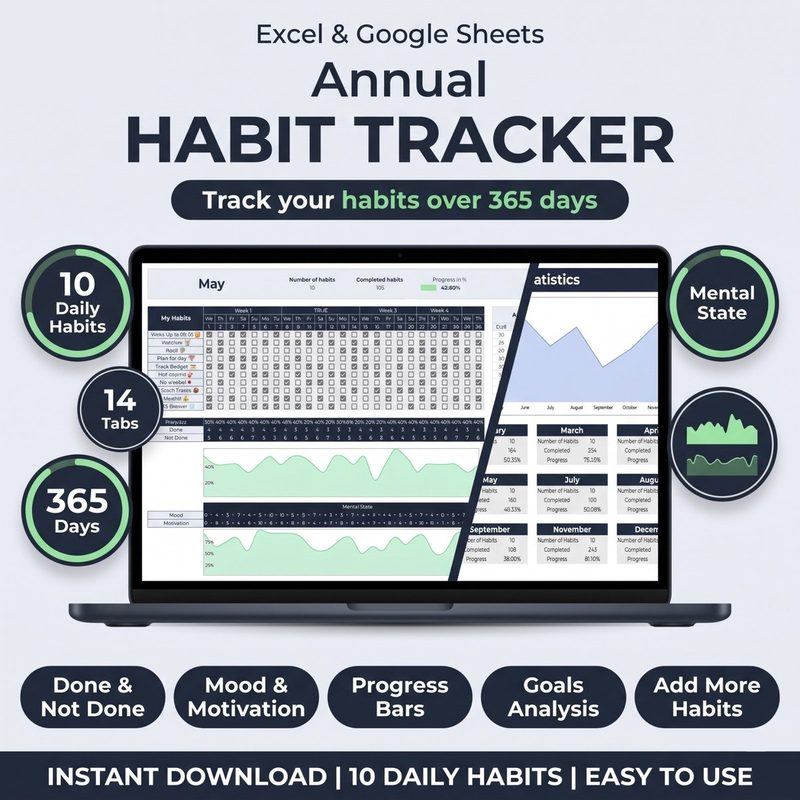
Short on time? If you want a pre-built, professionally designed tracker that works in both Excel and Google Sheets: with monthly and weekly views, streak tracking, and progress charts: check out the Habit Tracker for Excel & Google Sheets, a premium habit tracker Excel template with automatic dashboard and streak tracking. One purchase, lifetime access, both formats included.
Why Use a Habit Tracker Template?
Before diving into the options, it's worth understanding what a good template actually does for you. A habit tracker template is more than a checklist: it's a feedback loop. You record whether you performed a habit each day, and over time the data reveals patterns you'd never notice otherwise.
Studies suggest it takes anywhere from 18 to 254 days to form a new habit: and a tracker keeps you honest during that vulnerable window. The simple act of checking a box reinforces your identity as someone who follows through.
A well-designed template also helps you:
- See streaks: momentum is motivating. Visualizing a 14-day streak makes you think twice before breaking it.
- Spot drop-offs: if you consistently miss a habit on Wednesdays, that's a signal to adjust your routine, not your willpower.
- Track multiple habits: most templates support 5-15 habits at once, covering everything from exercise to reading to meditation.
- Review progress monthly: a monthly overview is far more useful than daily guesswork when you're deciding what to change.
Let's look at the best free options on each platform.
1. Excel Habit Tracker Templates
Microsoft Excel
Excel remains the most powerful offline option for habit tracking. Its formula engine, conditional formatting, and charting capabilities let you create trackers that are both functional and visually rich: without an internet connection.
Best free Excel templates we found in 2026:
- Vertex42 Habit Tracker: A clean, printable-style template with monthly tracking and a yearly overview. Free for personal use, well-structured for beginners.
- Microsoft's Official Habit Tracker: Available from the Office Template gallery. Simple monthly grid with conditional formatting that highlights progress. Limited customization but zero setup.
- Reddit Community Templates: The r/HabitTracker and r/productivity communities share well-built .xlsx files with advanced features like automatic streak counters and weekly averages.
The main drawback of Excel templates is portability. Unless you store your file on OneDrive and use Excel for the web, you're tied to a single device. For many people that's fine: their habit check-in happens at the same desk every morning. But if you switch between devices frequently, the next option may suit you better.
2. Google Sheets Habit Tracker Templates
Google Sheets
Google Sheets takes everything good about Excel and makes it cloud-native. Your habit tracker is always accessible from any device, auto-saves, and supports real-time collaboration if you want to track habits with a partner or accountability group.
Best free Google Sheets templates in 2026:
- Google Sheets Template Gallery: Google's own monthly habit tracker template. Minimalist, easy to duplicate for each month, and completely free. Lacks streak tracking but covers the basics well.
- My Habit Journals Habit Tracker: Our premium tracker works in both Excel and Google Sheets, with monthly and weekly views, automatic progress charts, conditional formatting, and streak logic. Available for $10 : one-time purchase.
- Indie Creator Templates: Several independent creators on Gumroad and Etsy offer free or pay-what-you-want Google Sheets trackers with modern designs, habit scoring, and weekly reflections.
Google Sheets' biggest advantage is that it works the same on your phone, tablet, laptop, and desktop. For a quick check-in: tap, check the box, done: it's perfectly functional.
3. Notion Habit Tracker Templates
Notion
Notion exploded in popularity over the last few years, and it now has one of the largest template ecosystems of any productivity tool. Habit trackers in Notion typically use databases with checkbox properties, rollups for streak calculations, and gallery views for visual progress.
Best free Notion habit tracker templates in 2026:
- Notion's Official Habit Tracker: A well-designed starter template with a monthly database view and a progress bar. Free, simple, and a good introduction to Notion databases.
- Red Gregory's Ultimate Habit Tracker: Red Gregory is a well-known Notion template creator. Her free habit tracker includes weekly check-ins, habit scores, and a clean dark-mode friendly design.
- Thomas Frank's Starter Pack: The popular YouTuber's free Notion starter pack includes a simple habit tracker database with relation properties for weekly reviews.
Notion's superpower is that your habit tracker lives alongside your notes, task manager, and project boards. You can link habits to daily journal entries or pull streak data into a dashboard: something neither Excel nor Sheets can do without add-ons. The downside is that Notion requires an internet connection and can feel slow on mobile, especially with large databases.
Which Platform Should You Choose?
There's no single "best" habit tracker template: the right one depends on how you work and where you already spend your time.
Choose Excel if: You prefer offline access, want maximum control over formulas, and always track from the same computer. Excel templates are also the most private: your data never touches the cloud.
Choose Google Sheets if: You switch between devices throughout the day, value auto-save, or want to share your tracker with a partner. Sheets strikes the best balance of power and accessibility for most people.
Choose Notion if: You already use Notion as your productivity hub and want your habit tracker integrated with your notes and goals. Notion templates offer the most visual flexibility and relational power.
If you're still unsure, try this: pick the platform you already open most often. A habit tracker you actually use is infinitely better than the most feature-rich template that collects dust. Start with a simple free template, track for 30 days, and upgrade to a more sophisticated system once you've built the tracking habit itself.
Habit Tracker for Excel & Google Sheets
Monthly & weekly views, streak tracking, progress charts : works in both platforms. One-time purchase, lifetime access.
Feature Comparison: Free Habit Tracker Templates
Here's how the three platforms stack up across the features that matter most for habit tracking.
What to Look for in a 2026 Habit Tracker Template
As you evaluate templates, keep these criteria in mind. The best free habit tracker template for 2026 should include at least a few of the following:
- Monthly overview: A grid showing each day with checkboxes per habit. The core of any good tracker.
- Automatic streak counting: A formula that calculates consecutive days for you.
- Progress visualization: A bar chart or completion percentage gives instant monthly feedback.
- Customizable habit list: Easy to add, remove, or rename habits without breaking formulas.
- Dark mode support: A template that looks good on dark backgrounds reduces eye strain during late-night check-ins.
Most free templates cover two or three of these. If you want all five in a single polished file, our Habit Tracker for Excel & Google Sheets includes monthly and weekly views, automatic streak logic, progress charts, unlimited custom habits, and a dark navy/gold design.
Start Tracking Today
The best time to start tracking your habits was yesterday. The second best time is right now. Pick one of the free templates above: or if you want something ready-to-go with no setup, grab the Habit Tracker for Excel & Google Sheets: and commit to tracking for 30 days.
You don't need to track everything at once. Start with three habits: one health, one work, and one personal. Track them every day for one month. At the end, review your data. Which days were strongest? Which habits need a different approach? Adjust and repeat. That's the entire system: no apps, no subscription fees.
Habit tracking takes two minutes a day and gives you clarity about where your time is going. The template is just the tool. The real transformation comes from showing up every day and letting the data guide you.
Ready to build habits that stick? Our Habit Tracker for Excel & Google Sheets gives you monthly and weekly views, automatic streak tracking, progress charts, and a beautiful dark navy/gold design : all for a one-time payment of $10. Works in both Excel and Google Sheets, lifetime updates included.