Every January, millions of people write down ambitious goals. Lose weight, learn a language, start a business, read more books. By February, most of those goals are abandoned or quietly forgotten. The reason is not a lack of motivation. The reason is a missing link between the goal and the daily action required to achieve it.
Goals operate at the macro level. They describe a desired outcome months or years away. Habits operate at the micro level. They describe what you do today, right now. Without a bridge between these two levels, even the most inspiring goal remains a wish. Your habit tracker Excel template is that bridge.
In this article, you will learn how to break any goal into trackable daily habits, how to set up your habit tracker for Excel and Google Sheets to support multi-month goal tracking, and how to use your tracking data to adjust your approach before goals slip away. You will never write another resolution that fizzles out by February.
Why Goals Without Habits Are Just Wishes
Research from the University of Scranton suggests that roughly 80% of New Year's resolutions fail by the second week of February. The problem is not the goal itself. It is the absence of a daily execution plan. A goal like "run a marathon" is inspiring, but it does not tell you what to do at 6 AM on a Tuesday when the alarm goes off and it is cold outside.
This is where habits outperform goals every time. Goals give you direction. Habits give you momentum. A goal says "I want to write a book." A habit says "I will write for 25 minutes every morning." One is a destination. The other is a vehicle. You need both, but most people only set the destination and never build the vehicle.
Your habit tracker Excel template fills this gap by turning your abstract goals into a concrete daily checklist. Instead of staring at a distant finish line, you focus on filling today's checkboxes. Each checkbox is a small step forward. Over weeks and months, those steps add up to real progress.
"A goal without a habit is just a dream. A habit without a goal is just motion. Pair them together, and you get progress."
: My Habit Journals
The Goal-to-Habit Framework: 5 Steps
Use this five-step framework to convert any goal into a set of daily habits you can track in your habit tracker for Excel and Google Sheets. The framework works for fitness goals, career goals, learning goals, financial goals, or personal development goals.
Step 1: Write Your Goal in One Sentence
Start with a single, clear sentence that describes your desired outcome. Be specific. "Get fit" is not a goal. "Run a 10K in under 60 minutes by December 31" is a goal. "Learn Spanish" is not a goal. "Hold a 5-minute conversation in Spanish with a native speaker by December 31" is a goal. Write this goal at the top of a new sheet in your habit tracker Excel template and treat it as the north star for everything below.
Step 2: Identify the Key Habits That Drive Progress
Ask yourself: what daily or weekly actions, if done consistently, would guarantee progress toward this goal? These are your key habits. For a 10K running goal, the key habits might be: run 3 times per week, do strength training twice per week, stretch for 10 minutes after each run. For a Spanish learning goal: study vocabulary for 15 minutes daily, listen to a Spanish podcast during commute, practice speaking with a tutor once per week.
List 3 to 5 key habits per goal. More than that becomes overwhelming. Your habit tracker Excel template has space for multiple habits per month, so you can dedicate a section of your tracker to goal-specific habits.
Step 3: Define Minimum and Target Versions of Each Habit
Every habit needs a minimum viable version that is so easy you can do it even on your worst day. The minimum for "run 3 times per week" might be "put on running shoes and walk for 5 minutes." The target version is your actual workout. This dual-definition approach prevents a busy or low-energy day from breaking your streak. You track the target when you can, and the minimum when you cannot. Both count as success.
In your habit tracker Excel template, you can use a simple yes/no checkbox for each day. But you can also add a second column to note whether you hit the target or the minimum. This gives you richer data about your consistency patterns.
Step 4: Set Quarterly Milestones
An annual goal is too far away to feel urgent. Break it into quarterly milestones that give you a sense of progress every 90 days. For the 10K goal, Quarter 1 might be "run 5K without stopping," Quarter 2 might be "run 8K," Quarter 3 might be "run 10K," and Quarter 4 might be "improve 10K time to under 60 minutes."
Your habit tracker Excel template lets you track month by month. At the end of each quarter, review your monthly completion data to see if you are on track for your milestone. This keeps your daily tracking connected to your bigger timeline.
Step 5: Track Everything and Review Weekly
Consistency is built through visibility. Fill in your tracker every day. Then once per week, spend 5 minutes reviewing the past 7 days. Ask yourself three questions: Did I hit my minimum for each habit? Which days were hardest and why? What can I adjust next week to make it easier?
This weekly review is where your habit tracker Excel template becomes a tool for continuous improvement, not just a record of what happened. The data you collect each week informs the adjustments you make the following week. Over time, you build a tracking practice that adapts to your life instead of breaking when life gets messy.
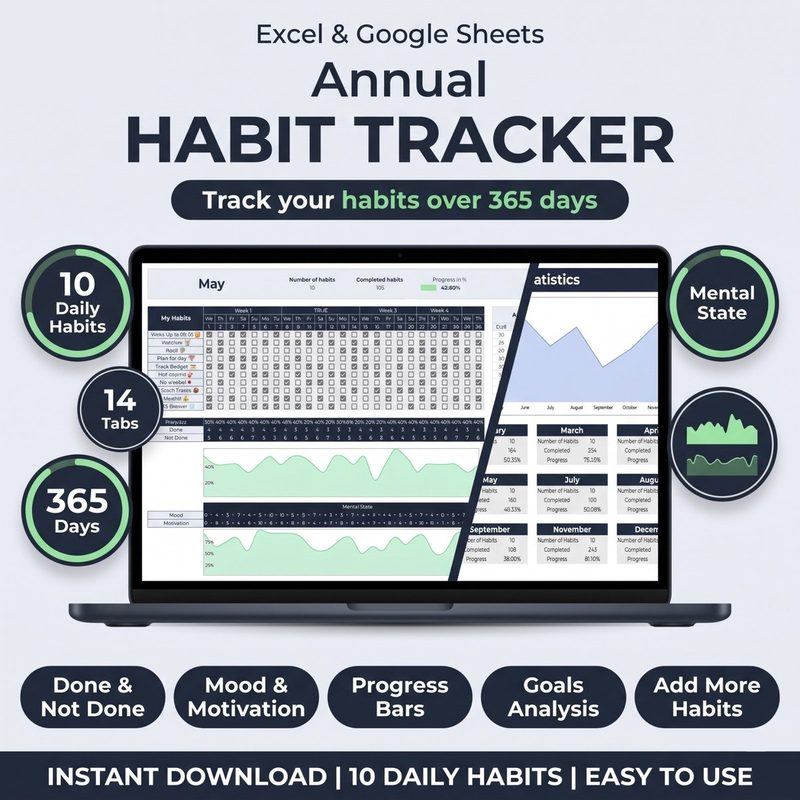
Bridge the gap between goals and habits. The Habit Tracker for Excel & Google Sheets includes monthly tracking sheets, automatic completion percentages, and streak counters. Set up goal-specific habit groups and track your daily progress toward what matters most.
Get the Habit Tracker · $10
How to Structure Your Habit Tracker for Goal Tracking
Your habit tracker Excel template is flexible enough to accommodate multiple goals at once. Here is how to set it up for maximum clarity:
- Dedicate one sheet per goal. If your template supports multiple sheets (Excel or Google Sheets), create a separate sheet for each major goal. Name it after the goal (e.g., "10K Training" or "Spanish Learning"). This keeps your tracking organized and prevents one goal's data from blending into another's.
- Use color-coded habit groups. Assign a color to each goal and use that color for the habit rows, headers, and checkboxes associated with it. Green for fitness, blue for learning, orange for career. When you scan your habit tracker Excel template, you can instantly see which goal areas are getting attention and which are being neglected.
- Add a goal progress row. Below your habits, add a row that tracks your milestone progress. For a running goal, this might be "weekly distance in kilometers." For a learning goal, "number of new words learned." This connects your daily habit data to your actual goal progress in a single view.
- Include a notes column for goal blockers. When you miss a habit tied to a specific goal, add context in a notes column. "Felt too tired after work" or "no time because of deadline." Over weeks, these notes reveal patterns. If you always skip your learning habit on Tuesdays, you can move it to a different time slot.
Real Example: Tracking a "Read 24 Books This Year" Goal
Let us walk through a concrete example using the framework above. Imagine your goal is to read 24 books in one year. That is 2 books per month. Here is how you would structure it in your habit tracker Excel template:
The Goal: "Read 24 books (approximately 2 per month) by December 31, 2026."
The Key Habits: Read for 25 minutes daily. Write a 3-sentence summary after each chapter. Finish 1 book every 2 weeks.
Minimum Versions: Read for 5 minutes (if 25 feels too much). Write one sentence about what you read. The minimum keeps the chain alive on low-energy days.
Quarterly Milestones: Q1: 6 books. Q2: 12 books. Q3: 18 books. Q4: 24 books.
Tracking Setup: In your habit tracker Excel template, create a sheet called "Reading Goal." Add three habit rows: "Read 25 min," "Chapter summary," and "Book finished." Use conditional formatting to highlight weeks where you read fewer than 5 out of 7 days. At the end of each month, check your completion percentage against your quarterly milestone.
This approach works because it removes all ambiguity. You do not need to decide whether to read today. Your tracker tells you that reading is a tracked habit tied to a goal you committed to. The checkbox creates accountability. The milestone keeps you oriented toward the bigger outcome.
Common Goal-Setting Mistakes and How Tracking Fixes Them
Mistake 1: Setting Too Many Goals at Once
Trying to improve everything simultaneously is the fastest path to improving nothing. Your habit tracker Excel template has limited rows, and your willpower has limited capacity. A good rule is to focus on no more than 3 goals at any given time. If you have 10 things you want to change, pick the 3 that would make the biggest difference and track those. Add more only when the first 3 habits feel automatic.
Mistake 2: Setting Goals That Depend on Outcomes You Cannot Control
"Get a promotion" depends on your boss, your company's budget, and market conditions. You cannot control those directly. Instead, track habits you control: "Complete one high-impact project per month," "Send one thoughtful update to my manager each week," "Learn one new skill relevant to my role every quarter." Your habit tracker for Excel and Google Sheets should track what you control, not what you wish for.
Mistake 3: Ignoring Data Until It Is Too Late
The most common reason goals fail is that people do not realize they are off track until the gap between their goal and their current position becomes too large to close. Daily tracking solves this. When you check your habit tracker every day, you notice a downward trend in week 2, not month 6. You can adjust before the goal is in danger. Your tracker is an early warning system that turns hindsight into foresight.
Set goals that actually happen. Stop writing resolutions that fade. The Habit Tracker for Excel & Google Sheets gives you the structure to turn any goal into daily habits with automatic dashboards and progress views. Start tracking what matters.
Get the Template · $10Using Tracker Data to Adjust Goals Mid-Year
One of the underappreciated benefits of using a habit tracker Excel template for goal setting is that it gives you permission to change your goals based on real data. Many people treat goals as sacred commitments that must be followed exactly as written. But life changes. Priorities shift. Circumstances evolve.
Your tracking data tells you whether your original plan was realistic. If you have been tracking "study Spanish for 30 minutes daily" for three months and your data shows you averaged 10 minutes per day, you have two options: increase your effort or adjust your goal. Both are valid. The key is that the data gives you an honest foundation for the decision instead of guessing.
Here is how to make data-driven goal adjustments using your tracker:
- Compare completion rate against milestone timeline. If you are 3 months into a 12-month goal and your average completion rate is 60%, you are trending behind schedule. You can either increase your habit frequency or extend your timeline.
- Look for blocked habits. If one particular habit consistently has low completion (e.g., "stretch after running" is always skipped), the habit definition may need changing. Maybe you hate stretching after running but would tolerate a morning stretch routine. Change the habit, not the goal.
- Review your notes column. The contextual notes you added on missed days are gold. If every missed day says "too tired in the evening," your habit timing is wrong. Move the habit to the morning. If every missed day says "traveling," build a travel-friendly version of the habit.
Quarterly Goal Review Template
At the end of every quarter, set aside 30 minutes for a formal goal review. Use your habit tracker Excel template as the primary source of truth. Here is a simple review structure you can follow:
- Check completion rates. Open each goal's tracking sheet and record your monthly completion percentages. Compare them to your quarterly milestone.
- Identify top 2 blockers. Scan your notes column for the most frequent reasons you missed habits. Write down the top two patterns.
- Decide: continue, adjust, or drop. For each goal, make one of three decisions. Continue as planned if completion is above 80%. Adjust the habit frequency, timing, or definition if completion is between 50% and 80%. Drop or pause the goal if completion is below 50% and the goal no longer feels important.
- Set next quarter's milestone. Based on your data, set a realistic milestone for the next 90 days. Use your actual completion rate to calibrate expectations rather than setting an aspirational number you have no evidence you can hit.
- Reset your tracker. Archive the completed quarter's data and set up fresh habit rows for the new quarter. Starting a clean sheet each quarter feels motivating and prevents your tracker from becoming cluttered with old data.
Frequently Asked Questions
How many goals should I track at the same time?
Three is a good maximum for most people. Any more than that, and your habit tracker becomes cluttered and your attention becomes fragmented. If you have more than three goals, rank them by importance and track only the top three. The others can wait until the first three become automatic.
Should I track habits for personal and professional goals in the same tracker?
Yes, but keep them visually separate. Use different color codes or different sheets within your habit tracker Excel template for personal versus professional goals. This helps you maintain balance without feeling overwhelmed by a single long list of habits.
What if I achieve my goal before the deadline?
Celebrate and set a new goal. The tracking structure you built does not disappear. You can use the same setup for a new goal. The skills you learned in breaking down goals into habits transfer to any new ambition.
What if I completely stop tracking for weeks or months?
It happens. Do not start over from scratch. Open your tracker, review where you left off, and pick the single most important goal. Restart the habits for that one goal only. Once you have momentum again, add the next goal. Your historical data is still valuable even with a gap.
The Bottom Line
Goal setting without habit tracking is like programming a destination into your GPS but never looking at the screen while driving. You might eventually get there by luck, but most of the time you will end up somewhere you did not intend.
Your habit tracker Excel template turns your GPS on. It shows you where you are today, where you were yesterday, and whether the direction you are moving matches the goal you set. It does not require motivation or willpower. It just requires you to check a box each day and review the data each week.
The goals that matter most to you deserve more than a once-a-year resolution. They deserve a daily tracking practice that keeps them alive, visible, and moving forward. Whether your goal is to run farther, read more, learn faster, or build something meaningful, the path is the same: break it down, track it daily, and review it weekly. Your habit tracker Excel template is the tool that makes this possible.
Open your tracker. Define your goal. Identify your key habits. Start checking boxes today.