Health and wellness goals are the most common New Year's resolutions for a reason. Almost everyone wants to exercise more, eat better, sleep deeper, drink more water, and manage stress. Yet the vast majority of these intentions fade within weeks. The problem is not a lack of motivation. The problem is a lack of structure.
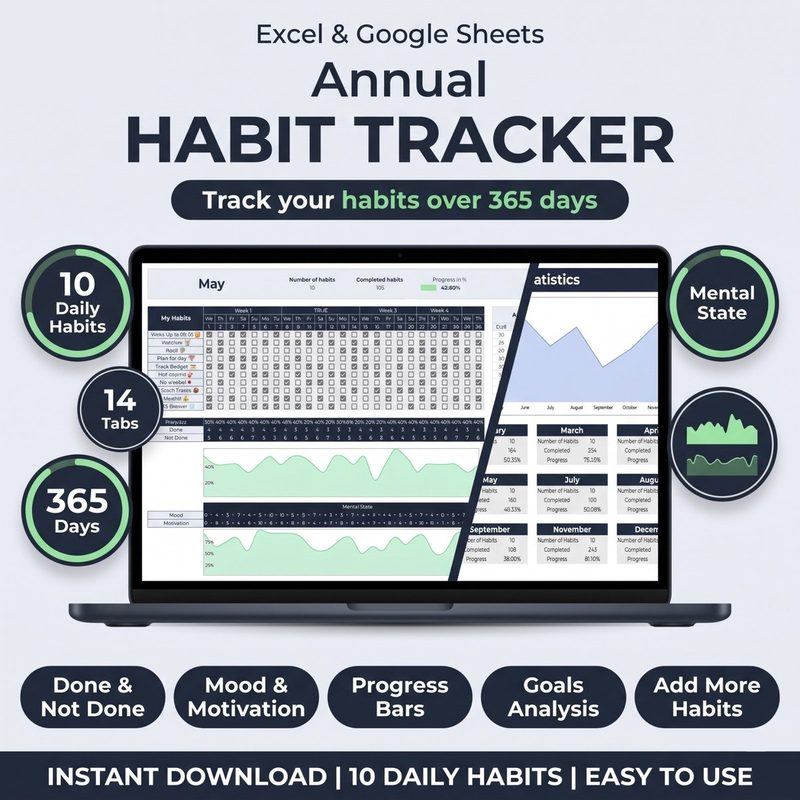
A habit tracker Excel template gives you that structure. It turns vague aspirations like "get fit" or "eat healthier" into concrete daily actions that you can check off, measure, and improve over time. Instead of relying on willpower, you rely on a simple visual record that shows whether you showed up for yourself today.
In this guide, you will learn exactly how to use a habit tracker Excel template to track the four pillars of health: fitness, nutrition, sleep, and hydration. You will also discover how to layer in stress management and mindfulness habits to create a complete wellness tracking practice.
Why Health Habits Need Tracking More Than Any Other Type
Health habits are uniquely hard to maintain for three reasons. First, the results are delayed. You do not see the payoff of a single workout or a healthy meal until weeks or months later. Second, the feedback is noisy. Your weight fluctuates day to day, your energy varies for a dozen reasons, and it is easy to convince yourself that one skipped workout does not matter. Third, health habits often compete with immediate comfort. The warm bed wins over the morning run, and the quick snack beats the prepared meal.
Tracking solves all three problems. It provides immediate feedback (the checkmark or the empty box). It creates visible streaks that make each day matter. And it turns abstract goals into concrete actions that you can see and count. A 2023 study published in the Journal of Behavioral Medicine found that participants who tracked their health behaviors daily were 82% more likely to maintain those behaviors after three months compared to those who did not track.
"What gets measured gets managed. The simple act of recording a health habit changes your relationship with it. It becomes a commitment rather than an intention."
: My Habit Journals
When you use a habit tracker Excel template for health, you are not just collecting data. You are building a feedback loop that keeps you honest, motivated, and aware of your progress even on days when the scale does not budge.
Pillar 1: Fitness Habits
Fitness is the most commonly tracked health habit, and for good reason. Regular exercise improves cardiovascular health, strengthens bones and muscles, boosts mood, and increases energy levels. But "exercise more" is too vague to track. You need to define what counts.
What to Track for Fitness
Here are the most effective fitness habits to add to your habit tracker Excel template:
- Workout completed. A simple yes/no each day. Define your minimum: 20 minutes of movement, a gym session, a home workout, or a run. The key is consistency, not intensity.
- Steps taken. Set a daily step goal (e.g., 8,000 or 10,000 steps) and track whether you hit it. This is especially useful on rest days from formal exercise.
- Stretching or mobility work. Even 5 minutes of stretching after a workout reduces injury risk and improves recovery. Track it as a separate habit so you do not skip it.
- Rest day. Yes, rest is a health habit worth tracking. Scheduled rest days prevent burnout and overtraining. Marking them intentionally helps you distinguish between planned recovery and unplanned laziness.
Setting Realistic Fitness Targets
The biggest mistake people make with fitness tracking is setting the bar too high. If you are starting from zero, do not aim for daily gym sessions. Aim for three workouts per week. Use your habit tracker Excel template to monitor your weekly frequency rather than daily streaks. A good tracker will show you your weekly completion rate automatically.
As your consistency builds, gradually increase the frequency or duration. The data in your tracker tells you when you are ready to level up. When you hit an 80% completion rate for three consecutive weeks, it is time to add another session or increase the difficulty.
Track every workout, step, and stretch. The Habit Tracker for Excel & Google Sheets lets you create separate columns for each fitness habit, with automatic streak tracking and weekly summaries so you always know where you stand.
Get the Habit Tracker · $10Pillar 2: Nutrition Habits
Nutrition is harder to track than fitness because it involves dozens of micro-decisions every day. The key is to track behaviors, not calories. Calorie counting is tedious and often inaccurate. Behavior tracking is simple and empowering.
What to Track for Nutrition
- Home-cooked meals. Track whether you cooked at home instead of ordering out or eating processed food. Even one home-cooked meal per day is a win.
- Vegetable servings. Aim for a specific number of vegetable servings (e.g., 3 per day). This is a positive habit (add more good stuff) rather than a restrictive one (avoid bad stuff), which makes it easier to sustain.
- Protein with every meal. A simple yes/no for including a protein source at each meal. Protein supports muscle repair, satiety, and stable energy levels.
- No sugar after 8 PM. A time-restricted eating habit that is easy to remember and track. It cuts out late-night snacking and improves sleep quality.
- Meal prep day. Tracking once per week (e.g., Sunday meal prep) ensures you set yourself up for success. A single checkmark per week is enough.
How to Avoid Nutrition Tracking Pitfalls
Nutrition tracking can easily slip into unhealthy obsession if you are not careful. Keep these principles in mind:
- Track additions, not restrictions. Focus on habits that add healthy foods rather than habits that remove foods. "Ate vegetables at lunch" is better than "Did not eat junk food."
- Use a simple scale. Rate your nutrition today as a 1 (poor), 2 (average), or 3 (great) instead of trying to capture every detail. A single rating is remarkably correlated with overall diet quality.
- Do not track every meal. Pick two or three nutrition habits that matter most to you and track only those. Over-tracking leads to burnout.
Pillar 3: Sleep Habits
Sleep is the foundation of all health. Poor sleep undermines workout recovery, increases cravings for unhealthy food, raises stress levels, and reduces willpower. Yet sleep is often the first thing people sacrifice when life gets busy. Tracking sleep habits can reverse that trend.
What to Track for Sleep
- Bedtime consistency. Track whether you went to bed within 30 minutes of your target time. Consistent bedtimes are more important than total sleep duration for regulating your circadian rhythm.
- Wake-up time. Same as bedtime. Track whether you woke up at your target time. A consistent wake-up time anchors your entire day.
- Sleep duration. Track hours of sleep (rounded to the nearest half hour). Most adults need 7-9 hours. Use your tracker to see how close you get on average.
- Screen-off time. Track whether you put away screens 30 minutes before bed. Blue light exposure before sleep disrupts melatonin production and delays sleep onset.
- Caffeine cutoff. Track whether you avoided caffeine after 2 PM. Caffeine has a half-life of 5-6 hours, meaning a 4 PM coffee still has half its effects at 10 PM.
A good approach is to track 2-3 sleep habits at a time. Once they become automatic, rotate in new ones. Your habit tracker Excel template should allow you to swap columns in and out without losing historical data.
Track your sleep alongside fitness and nutrition. The Habit Tracker for Excel & Google Sheets includes unlimited rows and customizable columns, so you can track sleep habits right alongside your other health goals in a single dashboard.
Get Started · $10Pillar 4: Hydration Habits
Hydration is one of the simplest health habits to track and one of the most impactful. Even mild dehydration (1-2% of body weight) reduces cognitive performance, physical endurance, and mood. The recommended intake is roughly half your body weight in ounces per day, but individual needs vary.
What to Track for Hydration
- Water goal met. Set a daily water target (e.g., 8 glasses or 64 ounces) and track whether you hit it. One checkmark per day is enough.
- Water before coffee. Track whether you drank a glass of water before your first cup of coffee. This simple habit improves morning hydration and reduces caffeine jitters.
- Water with every meal. Track whether you had a glass of water with breakfast, lunch, and dinner. This is an easy way to spread hydration throughout the day.
Hydration tracking works best when paired with a trigger. For example, every time you check your email or finish a meeting, drink a glass of water. Over time, the trigger becomes automatic, and you may not even need the tracker anymore.
Pillar 5: Stress Management and Mindfulness
Mental health habits are just as important as physical ones, but they are often overlooked in tracking routines. Stress management and mindfulness habits reduce cortisol levels, improve focus, and prevent burnout.
What to Track for Stress and Mindfulness
- Meditation session. Even 2-5 minutes of meditation counts. Track the consistency, not the duration.
- Journaling or reflection. A few minutes of writing about what went well or what you are grateful for. This is a proven mood booster with strong research support.
- Time outdoors. Track whether you spent at least 10 minutes outside. Sunlight exposure, fresh air, and nature have powerful stress-reducing effects.
- Digital detox window. Track whether you had at least one hour of screen-free time during the day. This could be during a meal, before bed, or first thing in the morning.
- Stopped work on time. For knowledge workers, tracking whether you closed your laptop at a reasonable hour is a powerful stress management habit.
These habits are often the first to be dropped when life gets busy. That is exactly why they need tracking. When you see them in your habit tracker Excel template alongside your other health habits, you are far less likely to skip them.
How to Set Up Your Habit Tracker Excel Template for Health Goals
Now that you know what to track, here is how to configure your habit tracker Excel template for maximum health and wellness effectiveness.
Step 1: Start with 3-5 Habits
Do not try to track all 15 health habits listed above at once. Pick one from each pillar:
- Fitness: Workout completed
- Nutrition: Vegetable servings met
- Sleep: Bedtime consistency
- Hydration: Water goal met
- Mindfulness: Meditation or journaling
That is five habits total. Track them for one month before adding more. The habit tracker Excel template makes it easy to add columns later as your tracking practice evolves.
Step 2: Define Your Minimum Viable Version
For each habit, define the smallest version that counts as a success. This is sometimes called the "2-minute rule" or the "minimum viable habit."
- Workout: 10 minutes of movement counts. Not 60. Not 45. Ten minutes.
- Vegetables: One serving counts. Not five. One.
- Meditation: One minute counts. Sit, breathe, done.
When the bar is this low, you have no excuse to skip. And once you start, you will often do more than the minimum anyway. But if you do exactly the minimum, that is still a win. The checkmark goes in the box.
Step 3: Use Weekly Reviews, Not Just Daily Checks
Your habit tracker Excel template likely includes a dashboard or monthly overview. Use it. Each week, spend five minutes looking at your completion rates. Did your fitness habit slip on Wednesday? Did your sleep habit improve when you cut out evening caffeine? These patterns are invisible without the weekly review.
The review is not about judgment. It is about data. A 60% week means something about your schedule or energy needs adjusting. A 90% week means something is working. Keep doing that thing.
Step 4: Rotate Habits Seasonally
Health needs change with the seasons. In winter, you might focus on sleep and stress management. In summer, fitness and hydration might take priority. Use your habit tracker Excel template to swap out columns every 3-4 months. Archive old habits rather than deleting them, so you can look back at your full year of health data.
Real Example: How One User Transformed Their Health with Tracking
James, a 34-year-old software developer, started using the habit tracker Excel template in January of this year. He was sedentary, ate mostly takeout, slept poorly, and felt constantly stressed. He started with just four habits: 20 minutes of exercise, one home-cooked meal, bed by 11 PM, and 8 glasses of water.
Month 1: His completion rate was around 50%. He missed many days, but the tracker showed him which habits were hardest. Bedtime was the biggest struggle, so he added a screen-off reminder 30 minutes before bed.
Month 3: His completion rate climbed to 75%. He started walking daily (his 20-minute exercise habit became automatic) and added a meditation habit. He lost 8 pounds without dieting simply because tracking home-cooked meals naturally improved his food choices.
Month 6: James tracks 8 habits now with an average completion rate of 85%. He runs three times per week, sleeps 7.5 hours consistently, and uses his morning commute for journaling. His blood pressure dropped from borderline high to normal, and his annual checkup showed significant improvement across all markers.
James did not use a fancy app or a restrictive diet. He used a simple habit tracker Excel template and the discipline of daily checkmarks. That is the power of tracking health habits: small, consistent actions compound into remarkable results.
Common Mistakes When Tracking Health Habits
Even with the best intentions, certain mistakes can undermine your health tracking efforts. Watch out for these.
Mistake 1: Tracking too many habits at once. The most common error. Starting with 10 or 15 health habits leads to overwhelm and abandonment within a week. Start with 3-5. Add more only when those feel automatic.
Mistake 2: Setting unrealistic standards. If "exercise" means a 60-minute gym session, you will skip it on busy days. Define a minimum version that you can do even on your worst day. A 10-minute walk counts. That is a win.
Mistake 3: Ignoring the data. Tracking without review is just data collection. Look at your numbers each week. What is trending up? What is slipping? Your habit tracker Excel template has the answers. Use them.
Mistake 4: Comparing yourself to others. Your health journey is yours alone. A 60% completion rate in your first month is excellent if you were at 0% before. Focus on your own trend line, not someone else's streak.
Mistake 5: Quitting after one bad day. A missed workout does not ruin your fitness. A skipped meal prep does not ruin your nutrition. The streak may break, but the habit is still intact. Get back to it tomorrow. Your tracker will be there waiting.
Your First Week of Health Habit Tracking
Here is a simple action plan to get started right now:
- Download a habit tracker Excel template. Grab the Habit Tracker for Excel & Google Sheets and open it.
- Pick exactly 4 health habits from the pillars above. One from fitness, one from nutrition, one from sleep, one from hydration or mindfulness.
- Define the minimum version of each habit. Make it so easy you cannot say no.
- Track for 7 days. Do not judge the results. Just collect the data.
- Review on day 7. What did you learn? Which habit was easiest? Which was hardest? Adjust and repeat.
That is it. One week of tracking to turn health intentions into health actions. Let the data guide you, and let the habit tracker Excel template do the heavy lifting.
Start tracking your health habits today. The Habit Tracker for Excel & Google Sheets is built for exactly this. Customizable columns, automatic streaks, monthly dashboards, and lifetime access for one price. Download it now and take the first step toward better health.
Get the Habit Tracker · $10The Bottom Line
Your health is the cumulative result of your daily habits. Fitness, nutrition, sleep, hydration, and stress management are not separate domains. They are interconnected pieces of a single puzzle. Tracking them together in a habit tracker Excel template gives you a complete picture of your wellness and shows you exactly where to focus your energy.
You do not need a gym membership, a meal plan, or a wellness coach. You need a simple tracking tool, a handful of clearly defined habits, and the commitment to check a box every day. Start small. Stay consistent. Let the tracker show you the way.