Why do some habits stick effortlessly while others fade after a week? Why does checking your phone feel automatic, but going for a run requires a mountain of motivation?
The answer lies not in willpower but in triggers. Every habit, good or bad, is set in motion by a cue. Your phone buzzes and you check it. You walk into the kitchen and grab a snack. You sit on the couch and reach for the remote. These actions happen without conscious effort because the trigger is wired into your environment.
The good news is that you can design triggers intentionally. By pairing specific cues with the habits you want to build, and tracking them inside your habit tracker Excel template, you can shift from relying on motivation to relying on automatic cues. This article will show you exactly how.
The Science of Triggers: Why Cues Matter More Than Motivation
In his book The Power of Habit, Charles Duhigg popularized the habit loop: cue, routine, reward. Every habit follows this three-step pattern. A cue (trigger) tells your brain to go into automatic mode. The routine is the behavior itself. The reward is the benefit you get, which reinforces the loop for next time.
Research from MIT's McGovern Institute for Brain Research found that habit formation is fundamentally a process of linking a specific cue to a specific behavior in the basal ganglia, the part of the brain responsible for automatic actions. Once that link is strong enough, the behavior runs without conscious thought. You do not decide to check your phone. The buzz triggers it.
This is why motivation-based habit building so often fails. Motivation is an internal, variable state. Some days you have it, some days you do not. A trigger, on the other hand, is external and stable. A pair of running shoes placed by your bed will be there whether you feel motivated or not. When you design triggers into your environment, you remove the need to decide. And what you do not have to decide, you do not have to negotiate with yourself about.
"Motivation is what gets you started. Habit is what keeps you going. But a trigger is what bridges the gap between intention and action. Without a trigger, even the strongest motivation fades into inaction."
: My Habit Journals
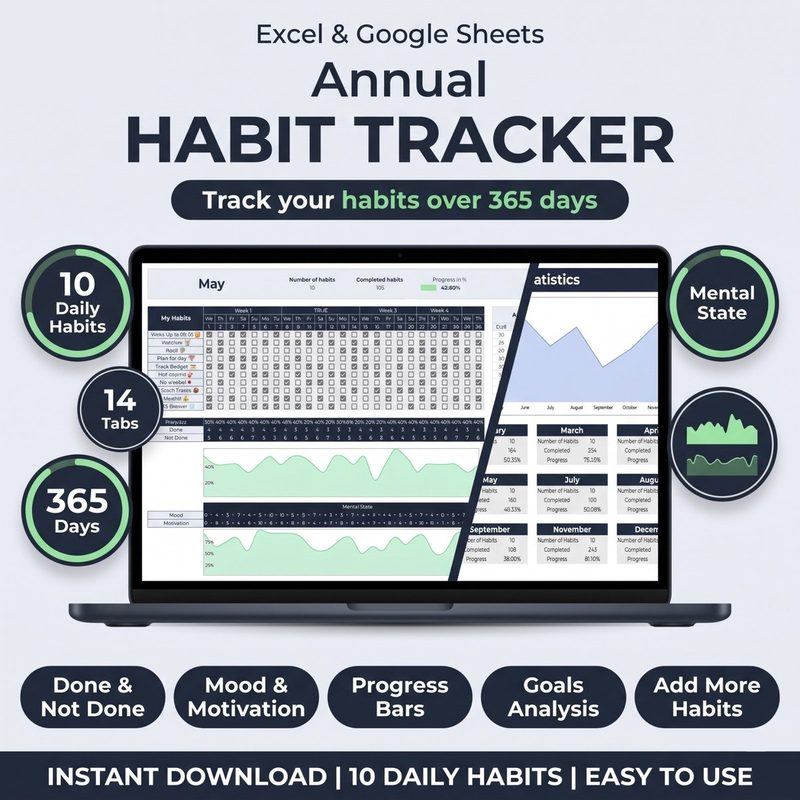
Design triggers that work automatically. The Habit Tracker for Excel & Google Sheets helps you track not just your habits, but the triggers behind them. Add a trigger column to each habit row and see which cues produce the highest completion rates.
Get the Habit Tracker · $10What Are Implementation Intentions?
An implementation intention is a specific plan that spells out exactly when and where you will perform a habit. The formula is simple: "When [trigger], I will [habit]."
This concept comes from psychologist Peter Gollwitzer, who showed that people who form implementation intentions are two to three times more likely to follow through on their goals than those who do not. The reason is that implementation intentions transfer control of the behavior from your intention (which fluctuates) to the environmental cue (which is stable).
Here are some examples:
- Weak intention: "I will exercise more." Implementation intention: "When I finish my last work meeting at 5 PM, I will immediately change into my workout clothes and do a 20-minute gym session."
- Weak intention: "I want to read more." Implementation intention: "When I get into bed and turn off the light, I will read one chapter of my book before touching my phone."
- Weak intention: "I should drink more water." Implementation intention: "When I sit down at my desk each morning, I will fill my 32-ounce water bottle and place it next to my keyboard."
The difference is specificity. A vague intention leaves room for negotiation. An implementation intention removes the decision entirely. The cue triggers the action. Your habit tracker Excel template is the perfect place to write down your implementation intentions and then track whether you followed through.
The 5 Types of Habit Triggers
Not all triggers are created equal. Some are more reliable than others. Here are the five most effective types of triggers you can use in your habit practice, ranked from most to least reliable:
| Trigger Type | Description | Example |
|---|---|---|
| Time-based | A specific time of day acts as the cue. Highly reliable because time is consistent. | "At 7:00 AM, I will meditate for 5 minutes." |
| Event-based | An existing routine or action triggers the new habit. This is habit stacking. | "After I pour my morning coffee, I will journal for 3 minutes." |
| Location-based | A specific place or environment cues the behavior. | "When I walk into the gym parking lot, I will put on my headphones and start my warmup playlist." |
| Person-based | Seeing or interacting with a specific person triggers the habit. | "When my accountability partner texts me, I will send them my completed habit log." |
| Sensory-based | A visual, auditory, or physical sensation triggers the behavior. | "When I see my water bottle on my desk, I will take three sips." |
Time-based and event-based triggers are the most powerful for daily habits because they are predictable. You can combine them for even stronger cueing: "At 7:00 AM (time) after I finish my coffee (event), I will meditate for 5 minutes."
Use your habit tracker Excel template to experiment with different trigger types. Create a column where you note the trigger you used each day, and after a few weeks, review which trigger types produced the highest completion rates for each habit.
How to Design Your Environment for Automatic Habits
Your environment is the most powerful leverage point for habit change because it operates below conscious awareness. You do not need to remember to act on a habit if your environment constantly reminds you. Here is how to design your spaces to support the habits you track in your habit tracker for Excel and Google Sheets:
Make the Cue Obvious
Place visual reminders in the location where you want the habit to happen. Put your running shoes next to your bed, not in the closet. Place your meditation cushion in the middle of the room, not folded in a corner. Leave your journal and pen on your desk, open to today's page. When the cue is impossible to ignore, the habit becomes hard to avoid.
Track this in your habit tracker Excel template by adding a "Cue Visible?" checkbox. If you find yourself skipping a habit, check whether the cue was in its designated spot. Often the difference between a successful day and a missed day is whether the trigger was physically present.
Remove Friction from the Cue-Action Path
Every step between the trigger and the action is friction. Reduce it ruthlessly. If you want to floss, keep the floss on your bathroom counter, not in the drawer. If you want to stretch, leave your yoga mat unrolled. If you want to read more, put a book on your pillow.
Your habit tracker Excel template can help you audit friction. When you miss a habit, ask yourself: was the trigger easy to act on, or did something get in the way? Write the friction point in a notes column and address it before the next day.
Use Temptation Bundling
Temptation bundling pairs a habit you want to build with something you enjoy. This creates a double trigger: the enjoyable activity cues the habit, and the habit becomes associated with pleasure. Examples: listen to your favorite podcast only while exercising, watch your show only while on the treadmill, enjoy a fancy coffee only while journaling.
Track temptation bundling in your habit tracker Excel template by adding a "Bundle" column where you note what enjoyable activity you paired with the habit. Over time, you will discover which pairings produce the highest consistency.
Design your triggers today. The Habit Tracker for Excel & Google Sheets includes customizable fields so you can track trigger types, environment cues, friction points, and temptation bundles alongside your daily habits. One template, endless possibilities.
Get the Template · $10Setting Up Your Habit Tracker Excel Template for Trigger Tracking
Your habit tracker Excel template is not just for checking off habits. It can be your trigger design workshop. Here is exactly how to configure it:
Step 1: Add a Trigger Column
Next to each habit row, add a column labeled "Trigger." Write the specific implementation intention for that habit. For example: "When I finish dinner, I will wash my dishes immediately." This keeps your trigger plan visible every time you open your tracker.
Step 2: Add a Trigger Type Column
Add another column labeled "Trigger Type" and use it to categorize each trigger as Time, Event, Location, Person, or Sensory. After a month, you can filter by trigger type to see which categories produce the highest completion rates. This data tells you what kind of cue your brain responds to best.
Step 3: Track Environment Setup as a Habit
Add a habit called "Environment Setup" that you check off when you prepare your triggers for the next day. This might mean laying out gym clothes, filling your water bottle, or placing your book on the pillow. Treating environment setup as its own tracked habit makes trigger design a daily practice instead of a one-time effort.
Step 4: Run a Weekly Trigger Audit
Each week, review your trigger data. Which habits had the highest completion rates? What trigger type was used for those habits? Which habits had low completion, and was the trigger weak or absent? Use this information to refine your triggers for the following week. Your habit tracker Excel template turns trigger design from guesswork into an evidence-based practice.
Real Example: How Maria Used Triggers to Fix Her Evening Routine
Maria, a UX designer and habit tracker Excel template user, struggled with her evening routine for months. She wanted to wind down earlier, but she always ended up scrolling social media until midnight. She had tried willpower, screen time limits, and even putting her phone in another room. Nothing worked.
Then she applied the trigger framework. She identified her current cue: sitting on the couch after dinner triggered the automatic routine of reaching for her phone. She designed a replacement cue chain:
- Trigger 1 (Event): After she finished dinner, she immediately washed her dishes (existing routine).
- Trigger 2 (Location): She placed her Kindle on the kitchen counter next to the sink. When she finished washing dishes, she saw the Kindle and picked it up.
- Trigger 3 (Time): At 9:30 PM, her smart lights dimmed automatically. The dimming lights cued her to move to the bedroom and start her wind-down.
Maria tracked all three triggers in her habit tracker Excel template. In the first week, her evening routine compliance went from 30% to 80%. By week three, she did not need to think about it. The triggers did the work. Her tracker confirmed that the trigger-based approach was three times more effective than her previous willpower-only attempts.
Common Mistakes with Habit Triggers
Even with a solid understanding of triggers, certain pitfalls can undermine your efforts. Watch out for these common mistakes.
Mistake 1: Using too many triggers at once. If every routine has a different trigger type and location, your brain cannot build automatic associations. Start with one or two habits and their triggers. Add more only when the first ones feel automatic.
Mistake 2: Choosing an unreliable trigger. A trigger like "when I feel stressed" is not reliable because stress is subjective and unpredictable. Stick to triggers that are consistent: specific times, specific events, or specific locations.
Mistake 3: Ignoring negative triggers. Your environment is full of triggers for bad habits too. The notification badge on your phone, the bowl of candy on your coworker's desk, the TV remote on the armrest. Identify your negative triggers and either remove them or design competing positive triggers. Your habit tracker Excel template can include a "Bad Trigger Noticed" column to build awareness of sabotaging cues.
Mistake 4: Changing triggers too often. It takes repetition for a cue-habit link to become automatic. Stick with the same trigger for at least two weeks before evaluating. Changing triggers every few days prevents the neural pathway from forming.
Mistake 5: Not tracking trigger effectiveness. If you do not measure which triggers work, you are guessing. Use your habit tracker Excel template to collect data on trigger types and completion rates. Let the numbers guide your trigger choices, not intuition.
Trigger Design Worksheet for Your Habit Tracker
Here is a simple worksheet you can set up inside your habit tracker for Excel and Google Sheets. Create a new sheet called "Trigger Design" and use these columns:
- Habit: The behavior you want to build.
- Current Cue: What currently happens right before you do (or want to do) this habit.
- Desired Trigger: Your implementation intention. "When [trigger], I will [habit]."
- Trigger Type: Time, Event, Location, Person, or Sensory.
- Environment Setup: What physical change is needed to make the trigger work.
- Week 1-4 Completion: Your monthly completion rate for this habit using this trigger.
Fill this out for each habit you track. After four weeks, review the data. Keep the triggers that consistently produce high completion. Redesign or replace the ones that do not. Over the course of a year, you will build a personal library of triggers that reliably drive your most important habits.
Frequently Asked Questions
How long does it take for a trigger to become automatic?
Research from University College London suggests it takes an average of 66 days for a new habit to become automatic, though individual times vary from 18 to 254 days depending on the habit's complexity. The key is consistency: the more reliably you pair the trigger with the habit, the faster the connection strengthens.
What if my trigger stops working after a few weeks?
This is called cue saturation. Your brain gets used to the trigger and stops responding to it. The solution is to vary the trigger slightly while keeping the core habit intact. If "after my morning coffee" stops working for journaling, switch to "after I brush my teeth" for a few weeks, then rotate back. Your habit tracker Excel template will show you which triggers maintain their effectiveness over time.
Can I use triggers to break bad habits too?
Yes, and this is one of the most powerful applications of the trigger framework. Identify the cue that starts the bad habit, then either remove the cue entirely or design a competing response for the same cue. If stress triggers stress eating, design a new routine: "When I feel stressed, I will take 10 deep breaths before eating anything." Track both the old and new responses in your habit tracker Excel template.
Should I track the trigger or the habit?
Both. Track the habit as your primary metric (did you do it?). But also track whether the trigger was in place. This gives you two data points. If you did the habit but the trigger was missing, you relied on willpower. If you did the habit with the trigger present, you relied on design. Over time, you want to maximize the second scenario.
The Bottom Line
Willpower is a limited resource. Triggers are renewable. The most effective habit builders are not the ones with the most discipline. They are the ones who have designed their environment so that discipline is rarely required.
Every habit you want to build can be paired with a specific, reliable trigger. Time, event, location, person, or sensory cue. Pick one, write it down as an implementation intention, set up your environment to support it, and track the combination inside your habit tracker Excel template.
The trigger does not need to be elaborate. A water bottle on your desk. A book on your pillow. Running shoes by the bed. These small environmental cues, tracked over weeks and months, compound into a life where your best habits run on autopilot.
Identify one habit. Design a trigger. Write your implementation intention. Track it in your habit tracker Excel template. Let the cue do the heavy lifting.
Build habits that run on autopilot. The Habit Tracker for Excel & Google Sheets gives you the structure to design, track, and refine your habit triggers. Customizable columns, monthly dashboards, and lifetime access for one price. Start designing your triggers today.
Get the Habit Tracker · $10