You have probably tried habit tracking before. You downloaded an app, added eleven habits on a wave of motivation, checked three boxes, and never opened it again. It is easy to read that story as a personal failure. It is usually a design failure instead.
The standard advice about habits, repeat it daily, never miss twice, let it become automatic, assumes three things the ADHD brain does not reliably supply: a working memory that holds intentions, a planner that turns intentions into time slots, and a dopamine hit that arrives on schedule. When those three are unreliable, habits collapse for reasons that have nothing to do with character.
The answer is not to try harder at a tool that fights your brain. It is to pick a tool that compensates for it. A well-built habit tracker Excel template does exactly that: it holds the memory you cannot, it makes progress visible enough to feel rewarding, and it keeps the daily work down to a few clicks. This guide covers why ADHD tracking works differently and how to set yours up so it survives a bad week.
Why Standard Habit Advice Fails the ADHD Brain
Three specific friction points cause most tracking attempts to die in week two. Naming them is the first step, because each one has a matching fix inside your spreadsheet.
- Out of sight is out of mind. A habit tracker inside an app that sits on page four of your phone does not exist. ADHD attention follows whatever is in front of you. If the tracker is not visible, it is not part of your day, no matter how much you meant it that morning.
- Working memory gaps. Holding "after coffee, do ten minutes of stretching" in your head while also remembering lunch, a meeting, and where you left your keys is a losing game. Every intention you have to remember is a chance to lose it. External memory beats internal memory, every time.
- Delayed rewards do not motivate. The payoff of a habit is months away. ADHD brains run on now. That is why the immediate, visible click of a checkbox matters so much more than the goal it represents, and why a tracker with color and streaks outperforms a plain list.
None of this is a flaw to fix. It is a wiring difference to design around, the same way you would design around a bad knee instead of insisting you should be able to run on it.
The ADHD Advantage of a Visual Habit Tracker Excel Template
Paper trackers work until you lose the page. Apps work until they disappear into a folder. A spreadsheet sits somewhere you already go, opens on any device, and shows the whole month at a glance. That combination happens to fit ADHD needs unusually well. Here is what a good habit tracker Excel template gives you that a to-do list cannot.
| ADHD Challenge | What the Tracker Does | Why It Helps |
|---|---|---|
| Forgetting the habit exists | One always-open grid on screen | Removes the need for recall |
| Weak response to long-term rewards | Instant color and streak feedback | Creates a small immediate win |
| Losing interest after novelty fades | Monthly visual pattern | Turns progress into something to look at |
| Overcommitting at the start | Fixed, small habit list | Keeps the daily load honest |
| All-or-nothing thinking | Completion percentage, not pass or fail | A rough week still shows partial credit |
The theme across all five rows is the same: the tracker removes a job your brain has to do, and hands it to the sheet. Less to remember means more to actually do.
Set It Up in Five Minutes, Not Fifty
The biggest predictor of whether an ADHD tracking habit survives is how long the setup takes. Long setups burn the motivation you needed for the habit itself. Keep it short and boring.
- Start with three habits, maximum. Two is better. Pick the ones that matter most this month, not the full wish list. You can add more once week one is done, and you probably will not need to.
- Write each habit as a tiny action. "Read" is a category. "Read one page" is a habit. If the smallest version feels almost too easy, it is right. The two-minute rule exists for exactly this reason, and it fits ADHD attention far better than an ambitious version you will avoid.
- Make the grid the centerpiece. One row per habit, one column per day. Nothing else on the screen competes for attention. A plain, visible grid beats a beautiful, complicated one you do not understand.
- Turn on color for completed days. Conditional formatting so a checked box fills green is not decoration. It is the visible reward that makes the tracking loop feel worth repeating.
- Add a placeholder for the anchor. A notes column where you write when and where the habit happens, such as "after morning coffee". This is your cue, stored outside your head. Pair it with the ideas in our guide to habit triggers and implementation intentions.
That is the whole setup. If your tracker takes an afternoon to build, you have designed something to admire, not something to use. A ready-made habit tracker Excel template skips this step entirely, which matters when setup energy is the scarcest resource you have.
Make It Visible Enough to Catch Your Attention
This is the single highest-leverage change most people skip. A tracker you have to remember to open is a tracker you will forget. So put it where your eyes already go.
- Pin the tab. In Google Sheets, right-click the browser tab and pin it, or set the sheet as a browser startup page. It should open without you thinking about it.
- Keep it open on a second monitor or a spare device. A tablet on the desk showing the month grid works better than an app notification you swipe away.
- Print the current month. Tape the grid to a wall you pass a hundred times a day. For many people with ADHD, paper on a wall beats every digital reminder, and the spreadsheet is simply how you generate the page.
- Use the phone app for logging only. The Google Sheets and Excel mobile apps let you tick a box in two taps. Logging on the go removes the "I will enter it tonight" step that so often becomes never.
Visibility is not a nice extra for ADHD tracking. It is the mechanism. The habit exists in your day only to the degree that the grid exists in your view.
Shrink the Streak Rules So They Cannot Break You
Streaks are powerful motivation for anyone, but they carry a specific risk for ADHD: the moment a perfect record is broken, the all-or-nothing brain decides the whole thing is ruined and stops. Protect against that before it happens, with rules that assume bad days are normal.
Rule one: a miss is data, not a verdict. One skipped day does not erase the month. Look at the completion percentage, not the perfect streak. If you tracked twenty-two of thirty days, you did not fail, you built a habit with a rough patch.
Rule two: never miss twice in a row if you can help it. This one rule saves more streaks than any amount of motivation. The second miss is where a pause turns into an ending. If you do miss twice, you already know the recovery plan from our guide on recovering from a broken streak.
Rule three: keep a floor version of every habit. On a bad day, "ten minutes of exercise" becomes "put on my shoes and step outside". The floor version still gets a checkbox. Logging a small win keeps the loop alive, and the loop is the point.
"For an ADHD brain, the goal is not a perfect streak. It is a loop that survives a bad day."
: My Habit Journals
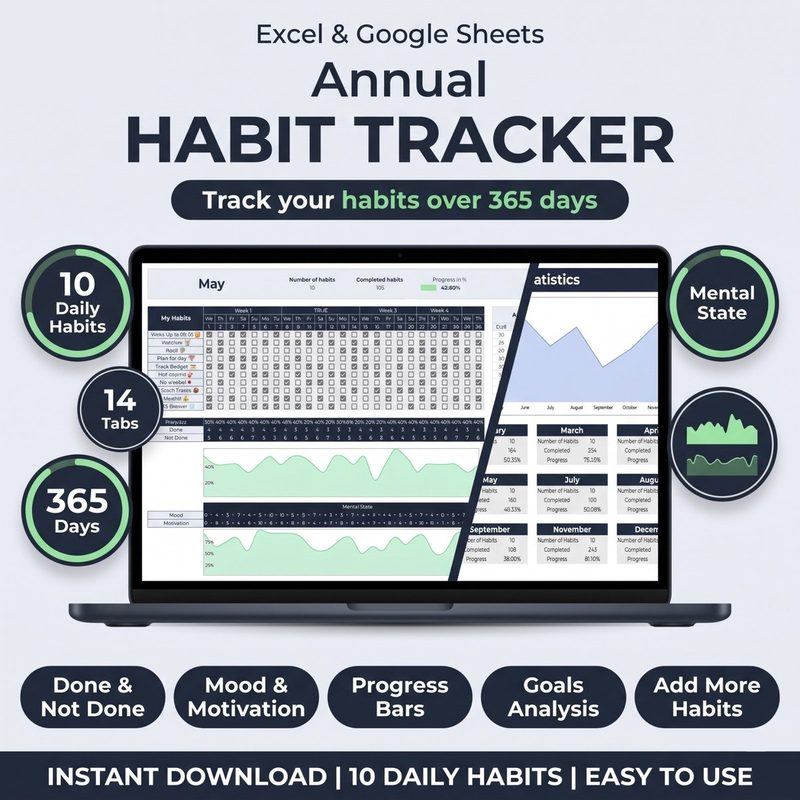
Skip the setup, keep the tracking. The Habit Tracker for Excel & Google Sheets comes ready to use with checkboxes, automatic streaks, a visible monthly grid, and a progress dashboard. No formulas to write, no afternoon lost to building.
Get the Habit Tracker · $10Lower the Friction for the Habit Itself
Tracking is half the job. The other half is making the habit easy enough to start when your attention is scattered. Friction is what decides whether a habit happens, and it applies twice as strongly on a low-focus day.
Prepare the environment the night before. Lay out the clothes, open the book on the page, fill the water bottle, set the yoga mat in the middle of the floor. Each of those removes a decision, and decisions are where scattered attention leaks away. This is the core of environment design, and it is arguably the most ADHD friendly habit tool available, because it works even when your motivation does not show up.
Then stop aiming for a perfect day. Aim for a started day. Starting is the bottleneck; once a habit is in motion, momentum does most of the work. Your tracker is there to record that you started, not to judge how well you did.
Review Weekly, Because Motivation Will Not Remember
One of the quiet ADHD losses is that progress disappears from memory as soon as it is not in front of you. You can have a genuinely good month and feel like you have done nothing. A short weekly review fixes that by making the evidence visible again.
Pick one moment a week, ten minutes is plenty. Open the dashboard, read the completion rates, and ask three questions: what worked, what got skipped first, and what is one small adjustment for next week. Write the answers in the same sheet so next week's review has something to compare against. Our deeper monthly habit audit walks through reading those patterns if you want more structure. If you want the psychology behind why any of this works at all, the piece on why tracking works covers the research.
Common Mistakes to Avoid
Tracking too many habits. Eleven habits is not ambition, it is a guaranteed failure. The rule of three exists because a short list survives and a long one does not.
Using a tracker you cannot see. If it takes three taps to reach, it is already gone. Move it to your home screen, your pinned tab, or your wall.
Rebuilding the tracker every month. The urge to redesign is real and it is a form of procrastination. Set it up once, then leave it alone and just tick boxes.
Quitting after a missed week. A missed week is a missed week, not a failed project. Restart at the floor version and let the next checkbox do the talking.
Waiting for a fresh start. Monday, the first of the month, and the new year are all excuses to delay. The best starting point is the next checkbox today, even if today is a Thursday and you have already skipped breakfast.
Treating medication, therapy, or support as separate from habits. Tracking supports whatever else you are doing. It does not replace professional care, and it is not a treatment for ADHD. It is a practical tool that makes daily routines easier to see and easier to repeat.
Frequently Asked Questions
Is a spreadsheet better than a habit app for ADHD?
For many people, yes. A spreadsheet is visible, flexible, and does not disappear into an app folder. It also opens on the device you are already using for work, which means one less place to check. Try both for two weeks and keep whichever one you actually open without reminding yourself.
How many habits should I track at once?
Two or three. ADHD motivation tends to spike at the start, and that spike tempts you into an eleven habit list you cannot maintain. Start with the two habits that would change your week the most, add a third only after week two, and keep the rest on a someday list outside the tracker.
What if I forget to log my habits for several days?
Backfill them at the end of the week if you honestly remember, then carry on. Do not abandon the sheet because the record is imperfect, and do not build a ritual around catching up. The point of the tracker is to change behavior going forward, not to produce a flawless certificate.
How do I keep tracking once the novelty wears off?
Assume novelty will fade and plan for it. Keep the habit list short, keep the visual feedback strong, and keep the weekly review on the calendar. Newness is unreliable motivation, so build the routine on structure and visible progress instead, which do not depend on feeling excited.
Can the template work alongside other routines?
Yes, and it usually works better that way. Many people track a morning anchor habit and an evening wind-down in the same grid, so the day is bracketed by two routines that are already linked to existing cues. Pair it with the ideas in our morning routine guide if you want a starting point.
The Bottom Line
ADHD habit tracking is not about becoming a more disciplined person. It is about building a loop that does not depend on the two things ADHD makes unreliable: remembering, and feeling motivated on schedule. A visible grid carries the memory. Color and streaks supply the small immediate reward. A short habit list keeps the daily ask realistic. Together, those three turn consistency into something the sheet supports instead of something you have to summon.
Start with two habits, a floor version of each, and a month grid you cannot miss. Tick today's box, let the color land, and repeat tomorrow. When a day goes sideways, log it anyway and move on, because the streak you are protecting is not a perfect record, it is the habit of showing up at all.
Design for your brain, not against it. Short list, visible grid, and a checkbox you can actually reach.
Ready to make tracking easy? The Habit Tracker for Excel & Google Sheets gives you a visible monthly grid, automatic streaks, and a progress dashboard, all set up and ready to use on day one. One-time purchase, lifetime access, $10.
Get the Habit Tracker · $10